How to Lower Shipping Costs – Use Media Mail

September 24th, 2014 12 comments

When it comes to shipping books, DVDs and other media, nothing beats U.S. Postal Service’s Media Mail rate.  This  blog-media-mailcost-efficient shipping class allows you to send pounds of media for a fraction of the cost, which can save your small business money.
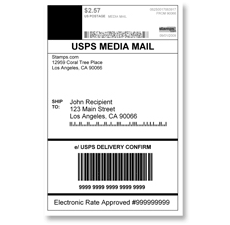
Media Mail rates can be 50% lower than Priority Mail
Media Mail starts at $2.38 for the first pound and 39 cents for each additional pound. If you mail a 3-pound package of books through Media Mail, it will cost $3.16 compared to the $10.20 it would cost to mail the same weight placed in a Priority Mail Flat Rate Medium Box.  That is a 69% savings! Packages shipped via Media Mail can include other USPS services, such as package insurance, Delivery Confirmation, Signature Confirmation and COD.

Items that can be mailed include books that are at least 8 pages, film that is 16 mm or narrower, printed music, printed test materials, video and sound recordings, play scripts, printed education charts, medical information contained in binders or loose-leaf pages and computer-readable media.

USPS has restrictions for Media Mail
Although Media Mail is a great way to send media while saving money, it does have some restrictions. The package can’t contain advertising except for incidental book announcements. All Media Mail packages are subject to inspection, and if postal employees find something that isn’t supposed to be included, like a birthday card, your package will be returned to you.

Another common complaint about Media Mail is delivery time. It can take 2 to 9 days for Media Mail packages to arrive (some message boards claim even longer during the holidays), so items that need to be delivered on a short time frame should be sent using other services, such as the 2-day Priority Mail.

USPS assumes no liability for packages sent through Media Mail unless you buy package insurance. That means that if you are using Media Mail to send items of value to your customers, you should request the buyer to purchase package insurance and delivery confirmation tracking.  Stamps.com customers only pay 19 cents per package for delivery confirmation (the post office charges 70-80 cents), which is an inexpensive way for a business to give its customers piece of mind about the location of their package.

Categories: Ecommerce Shipping, Shipping Tags:

3 Tips to Turn your Garage into a Fulfillment House

September 24th, 2014 2 comments

fulfillment_blogFollowing these three tips can drastically reduce the time you spend fulfilling orders and can help you ship your product out to your customers faster and easier.

Tip #1  Get Organized

If you’re shipping multiple products on a regular basis, it is critical that you know exactly where your inventory is.  This will allow you to quickly package and ship your products.  A great way to accomplish this at home is to put each product you have in its own cardboard box or plastic storage bin and then clearly label each box on the outside.  By putting everything in its own box, your products will not get mixed up and you will not waste time hunting down products for each order.

Another good tip is to write the number of units on the outside of the box; as you ship units from the box, you can cross out the inventory number and re-write the new number.  This is a great first-step to help you manage your inventory.

Tip #2  Work when you want, not when you need to

One way to streamline your fulfillment process is to prepare your products for shipment when it is most convenient for you, and not wait until your item has sold/been paid for.

For example, let’s say that you sell teddy bears that you buy unpackaged.  Maybe you get them at garage sales, maybe you make them, or maybe you buy them in bulk.  Either way, they will need to be individually packaged in their own box before you ship them to your customers.  While you could wait to package them until they’ve actually sold, there may be a more efficient solution:

At a time that is convenient to you, package all of the bears in their own ready-to-ship box.  There are a number of advantages to pre-packaging your product:

A) Once your buyer pays you, you are ready to ship.  The faster you can ship, the happier your customers will be.

You may still need to print out a shipping label and drop a packing slip in with the bear, but you are as ready as you can be to ship each bear as fast as possible.

B) By batching up your packaging, you will spend less total time preparing each order.  Huge operational efficiencies can be gained by performing processes in batch and packaging your products is no exception.  This means less time spent on fulfillment and more time spent elsewhere.

C) Pre-packaging allows you to work when you have time to work by allowing you to get some of the work done when it is convenient for you.  Obviously you can’t ship a product until it sells, but that doesn’t mean you can’t get started.

Tip #3  Preparing your daily fulfillment

Similar to packaging your products in batch, there are operational efficiencies to be gained when shipping your products, particularly with Stamps.com which allows you to batch print all of your shipping labels in a single step.  Instead of shipping orders one at a time throughout the day, take advantage of the efficiencies of batch shipping all of your orders at a single time every day.

The first step to batch shipping is to choose a time that works for you.  Ideally, the time you choose will allow you to finish fulfillment as close as possible to when your mail carrier usually shows up.  This will allow you to squeeze as many orders as possible into today’s batch label printing compared to making your customers wait an extra day to receive their product.

Once you determine when you want to batch your shipments, the next step is to print out both packing slips and shipping labels so you can fulfill your orders.  With Stamps.com, you can retrieve order data directly from eBay, Amazon.com and other sources to quickly batch print all of your shipping labels.  Combine these with packing slips that can be printed directly from eBay, Amazon, or an alternate source and you will be ready to fulfill your orders.

After you pack, label, and seal your shipments, you’re done.  Stamps.com allows you to schedule a free USPS carrier pickup for all of your packages as long as you are shipping at least one Priority Mail or Express Mail package.  The software also automatically posts-back all of your tracking numbers to eBay or  Amazon so your buyer knows the product is on its way.

Categories: Ecommerce Shipping, Shipping Tags:

6 Tips for Package Shipping to APOs/FPOs

September 24th, 2014 3 comments

The men and women in the military look forward to receiving packages and letters from their friends and family back home.  However, many times it is tough to narrow down their exact shipping address if they are active duty military personnel deployed overseas. Due to this problem, the military has developed APOs and FPOs.military

What is APO or FPO?
APO, which stands for Army Post Office, can take items for people serving abroad in the army or Air Force. Letters sent to an FPO, or Fleet Post Office, can be delivered to people in the Navy and on ship-based missions outside of the United States.

What makes APO/FPO address different from a street address is that part of the delivery is handled by the Department of Defense to get it to areas outside of the continental United States. Unlike mail sent to a street address or post office, APO/FPO addresses have “AA,” “AE” or “AP” listed in the state category. Although other shipping services, such as FedEx and UPS, send packages to other countries where military forces are concentrated, only the USPS is able to send an item to an APO or FPO.

USPS Tips For Mailing To APO or FPO:
Before you prepare your letter or package, there are a few things you will need to know about mailing items to an APO/FPO.

Tip #1  Packages must be less than 70 pounds and smaller than 130 inches in length and girth combined.

Tip #2  Don’t include alcohol, perishables, firearms or any hazardous materials in your package, either.

Tip #3  Some zip codes have additional restrictions, so it pays to research them before mailing your parcel. Contact the Military Postal Service Agency at 1-800-810-6098 for additional restriction details.

Tip #4  Addressing your letter or package properly will ensure its arrival. The Department of Defense requires you to use the service member’s full name, the unit and APO/FPO with a 9-digit zip code and a return address.

Tip #5  If you are just planning to mail a letter that weighs a few ounces, you will not need to fill out a customs form. However, if you are sending a package, you must attach a customs form detailing where your package is going and what is inside.

Tip #6  You must give your APO/FPO parcel to a USPS employee in order to mail it. If you don’t feel like going to the post office, you can schedule an in-person carrier pickup at your home through Stamps.com.

Going the extra mile to send a package to someone in the armed forces is an easy gesture that will brighten a soldier’s day. With these rules in mind, your shipping process will be problem-free.

Special Note for Stamps.com Customers:  To send a package to an APO or FPO address, Stamps.com customers need to use the “Packages” tab.  This “Packages” tab is built for domestic postage and does not automatically create a U.S. customs form.  You will need to complete and attach a customs form manually for your package.

Categories: Letter Mailing, Shipping Tags:

Call us toll-free at 1-888-434-0055

Monday–Friday, 6am–6pm Pacific Time