Version 9.6 – New Automated Tools for E-Commerce Sellers
Stamps.com is pleased to announce the launch of Version 9.6 — a free upgrade for Stamps.com customers! Download Stamps.com Version 9.6 now! The software introduces many automated features for e-commerce sellers, helping to streamline shipping operations and increase productivity. Key new features include:
Batch Shipping Toolbar and Interface Redesign
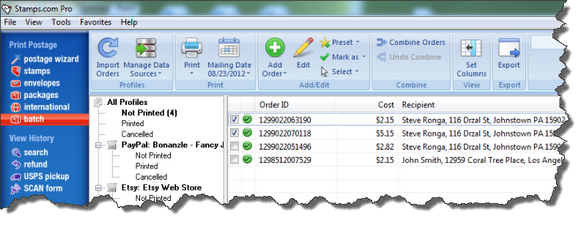
— Redesigned user interface in the Batch shipping section.
— Features include an easy-to-use toolbar, a “print” button with options to print shipping labels and/or packing slips, and a quick-edit panel to make order adjustments to your shipping label.
Customs Forms Now Include Product Data on Import
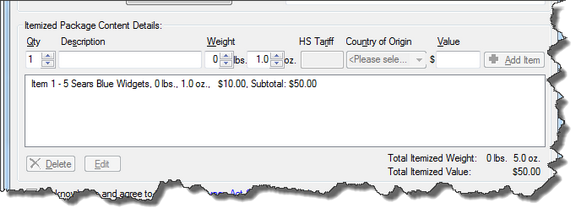
— Insert product data from your external data source (eBay, Amazon, Shopping Cart, etc.) into your customs forms automatically
— Allows you to batch print your customs forms
Combine Multiple Orders from a Buyer into a Single Order
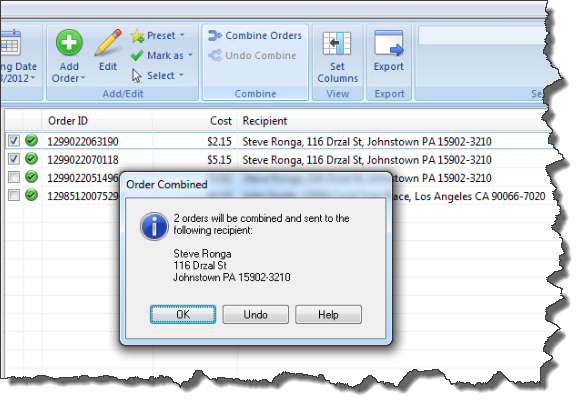
— Combine multiple orders from a buyer into one single order
— Delivery Confirmation™ numbers will post back to all orders in a combined package
Default Printers Created for Shipping Labels and Packing Slips
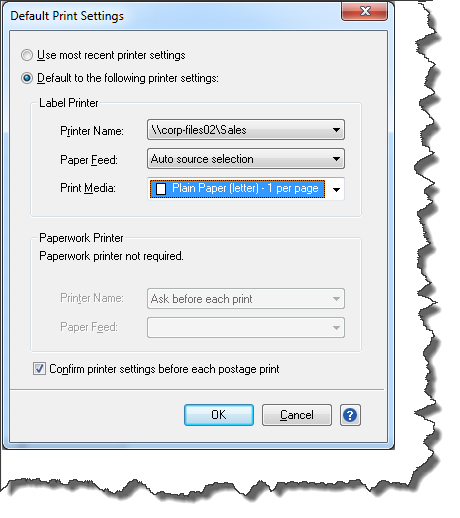
— Receive support for two default printers — one for printing shipping labels and a second for printing packing slips or customs forms
— Print items simultaneously in one print query
Enhancements to Current Features
— New address book functions for batch orders, Intelligent Mail Barcode printing on envelopes, and support for more postage scales
— Many other features and fixes are also included