Packing Slips and Other New Features Now Available!

September 24th, 2014 Comments off

We are pleased to announce the launch of Stamps.com Version 8.8 – a free upgrade for Stamps.com customers!  Here are some of the major new features included as part of Stamps.com Version 8.8:

New Feature #1 – Print Packing Slips
screenshot_batch8_8

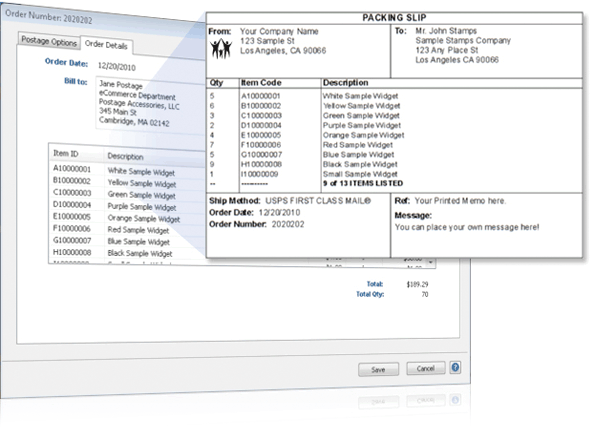
Available on the “Batch” tab, customers who import their ecommerce orders from popular marketplaces like Amazon, eBay and PayPal can now print packing slips alongside their shipping labels.  Packing slips will show Order Date, Billing and Shipping Address Info along with Item ID, Description and Quantity for up to ten products.  Packing slips have been one of our most requested features and we are very excited to add this feature to Version 8.8.

New Feature #2 – Ship Without Delivery Confirmation
screenshot_noDC_8_8

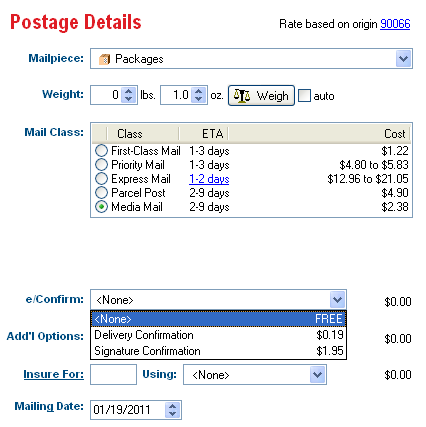
While Delivery Confirmation is free for Priority Mail and tracking is free for Express Mail, the USPS charges $0.19 for Delivery Confirmation for First Class Packages, Parcel Post and Media Mail (if you purchase Delivery Confirmation at the Post Office, the cost is $0.70-$0.80).  Previously, all eligible shipping labels were printed with Delivery Confirmation regardless of whether or not the service was included for free.  Based on customer feedback, we have made the $0.19 Delivery Confirmation for First Class, Parcel Post, and Media Mail an optional service in the Version 8.8.

New Feature #3 – Customize your Shipment Notification Emails

screenshot_email_8_8_v2

Stamps.com Version 8.8 has added customization options for your Ship Notification Emails.  You can now control what is listed in the “From” and “Subject” fields as well as customize the text that is included in the body of the email.  Additionally, you have the options to include order details such as Quantity, Item ID and Product Description in the email.   If you are already running version 8.8, click here to make changes to your Ship Notification Email .

Important! You must download Version 8.8 in order to use these great new features.   Download Version 8.8 today at www.stamps.com/download – it’s free for existing customers!

To learn more about the great new features in Version 8.8, join us for a free webinar on March 1 from 9 AM to 10 AM Pacific Time.  Click here to reserve your spot today!

Categories: Uncategorized Tags:

Free Webinar – Score.org’s 10 Tips for Small Business Success

September 24th, 2014 Comments off

Co-hosted by the SCORE Foundation – Counselors to America’s Small Business

Stamps.com is teaming up with our friends from SCORE Foundation to review some critical tips that will help position your small business for success! We will discuss everything from financing, marketing, business development and much more. webinar-score-tips

What: Free webinar to discuss small business tips for achieving success

When: Wednesday, February 23 at 11:00 am PT / 2:00 pm ET

Where: Register at https://www2.gotomeeting.com/register/576659203

Key things you will learn in this free webinar:
– How to develop a winning marketing plan
– Online strategies to promote your business
– Effective ways to use social media to reach new customers
– Email marketing tips

Categories: Uncategorized Tags:

Stamps.com Video – How to Import Orders from Amazon

November 15th, 2019 Comments off
We have a new video that showcases how easy it is to connect your Amazon Pro Merchant account to Stamps.com. Once your account is connected, you’ll be able to easily import all of your Amazon orders into Stamps.com so you can print shipping labels for all USPS mail classes, including Media Mail and First Class Mail International.
Stamps.com will also post-back the delivery confirmation details into your Amazon account.  (For First Class Mail International packages, the customs forms number will post-back.) This process completely eliminates the need to manually input any address data.

Our new “How to” video showcases how easy it is to connect your Amazon Pro Merchant account to Stamps.com. Once your connection is established, you’ll be able to easily import all of your Amazon orders into Stamps.com so you can print shipping labels for all USPS mail classes, including Media Mail and First Class Mail International.

Stamps.com will also post-back the delivery confirmation details into your Amazon Pro Merchant account.  (For First Class Mail International packages, the customs forms number will post-back.) This process completely eliminates the need to manually input any address data.

Get detailed instructions on the Stamps.com Amazon integration

Categories: Ecommerce Shipping Tags:

3 Tips for Addressing International Letters and Packages

September 24th, 2014 Comments off

Properly addressed mail ensures that your letter or package will encounter the fastest delivery to its destination. And since international mail requires the help of the international host country’s postal carrier, proper addressing is even more important than ever. Stamps.com has put together this list of 3 tips for addressing international letters or packages.

Tip #1 – Make sure the delivery address is properly formatted
A properly addressed envelope or package will make all the difference in whether or not your mailpiece arrives at its destination on time, or if at all.   The USPS has the following suggestions for addressing your letter or package:

  • USPS suggests printing your delivery addresses in all UPPERCASE letters.
  • When possible, delivery addresses should have no more than five lines.
  • The last line of the delivery address should include only the full spelling of the country name – do not use abbreviations!
  • Foreign postal codes, should be placed on the line above the destination country.
  • Make sure you include a Sender’s Return Address in the top corner of the package.  Due to recent security concerns, many packages that don’t have return addresses are subjected to additional security screening and some packages are not delivered at all.
  • Print the delivery address information, using a pen or permanent marker, so the address will stay legible even in poor weather conditions. 
  • Names and delivery address info should be printed in English.  You may also include a foreign language spelling of the city, province, and country, but that would need to be in addition to the English spellings.   

Tip #2 – Include Card with Delivery Address and Package Contents Inside Package
While this is a common tip that you may have seen previously, the USPS states that it rarely is followed. Improperly wrapped packages can fall apart during the shipping process.  The USPS employees will try to pair together open boxes with its contents, but that can be like finding a needle in a haystack.  If the USPS finds a card that includes the contents of the package and delivery address, it is much easier to match the contents with the empty box and send the package on its way to its destination.

All package contents that are not matched along with misaddressed letters are sent to the USPS Mail Recovery Center in Atlanta for auction. 

Tip #3 – Natural Disaster? Check the USPS International Service Updates web page
This tip is a hidden gem for ecommerce sellers trying to avoid negative seller ratings.   The USPS has a web page called the International Service Updates that includes real-time info on the current mailing conditions worldwide.    

When political changes happen (like we’re seeing in Egypt) or natural disasters occur (such as the recent flooding in Australia), mail delivery can be disrupted and slowed down considerably.    This USPS web page provides info on the country and postal codes that are being affected by that natural disaster.

This International Service Updates page provides ecommerce sellers valuable info so you can communicate to your buyer their package will encounter delivery delays due to the natural disaster or for other reasons that are out of your control.

Categories: Letter Mailing, Shipping Tags:

Call us toll-free at 1-888-434-0055

Monday–Friday, 6am–6pm Pacific Time