
Coronavirus Delivery Service Alerts: Get the latest info on possible mailing and shipping delivery delays.
Stamps.com Blog
Get the latest information on the mailing and shipping industry.
Get the latest information on the mailing and shipping industry.

Welcome to our United States Postal Service Updates blog, your guide to the changing postal scene. Here, we’ll share the latest news and rate updates from the USPS. Dive in as we break down the 2024 updates.
Stamps.com has been informed of the recent USPS announcement which recommends postage rates increase for select First-Class Mail services on July 14, 2024. We will alert you of these and any other changes as new details become available. At this time, our current postage stamp rate remains at 64 cents.
The United States Postal Service (USPS) is implementing a new technology standard called Intelligent Mail Indicia (IMI) to modernize its mailing system.
IMI replaces the older technology and provides the USPS with more detailed and real-time data on your mailings. This translates to a smoother and more efficient mailing experience for everyone. Upgrading offers several benefits:
The good news is, you don’t need to take any action. Stamps is already working diligently behind the scenes to ensure our technology is fully compliant with IMI by December 2024. As an approved USPS partner, we’ll make sure your mailing operation continues to run smoothly without interruption.
Effective January 21st, the USPS is rolling out changes to its shipping rates, which will impact various services and package categories. Stamps remains committed to delivering top-notch service to its customers and is happy to announce that, through our partnership with USPS, customers can now enjoy enhanced discounts on Priority Mail® and Ground Advantage Rates™ compared to Commercial Plus rates.
Here’s an overview of the modifications and how they might impact your shipping and mailing strategies.
As a reminder, Ground Advantage™ was introduced in July of 2023. This service combines USPS Retail Ground, USPS Parcel Select Ground, and USPS First Class Package Services. The January 21st changes will apply to all weights, zones, and cubic dimensions over 12 ounces using Ground Advantage™.
So where will you see the biggest changes? The short answer: it depends. Exact rates will vary depending on the package details and how far it’s traveling. As always, we recommend comparing rates and services to find the best option for your business.
The cost of sending a 1 oz. First Class Mail letter will increase from 66 cents to 68 cents. However, if you use Stamps.com, the Metered Mail rate for the same letter will only go up from 63 cents to 64 cents, saving you $0.04 compared to the retail rate.
While the primary focus of this rate adjustment is on shipping rates, it’s crucial to be aware of unrelated changes to HAZMAT labels. Starting January 21st, USPS is enhancing safety measures for handling dangerous goods shipments. The HAZMAT labels will now feature an oversized letter “H” in the corner, the addition of 2D barcodes, and the inclusion of the word “HAZMAT” after “USPS TRACKING #.” Shippers need not take any specific action other than selecting hazardous goods under special services when printing a label when a shipment contains hazardous materials. For more information check out our HAZMAT updates blogs.
In addition to the rate adjustments, Stamps.com users should be aware of an increase in their insurance rates. However, depending on your service plan, you could enjoy discounts ranging from 10% to 40% compared to USPS insurance rates.
Despite these changes, Stamps.com continues to offer substantial savings on shipping costs, with discounts of up to 89%* through its partnership with USPS and other carriers. We aim to streamline your shipping and mailing operations, providing discounted rates for a smooth sending process.
As the shipping landscape evolves, staying informed about rate changes and adjusting your strategy accordingly can contribute to a more efficient and cost-effective shipping experience. Keep these insights in mind as you navigate the 2024 USPS shipping rate adjustments. For more information check out our help center article.
*Rates are limited to shipping from the continental U.S. only. These rates and discounts exclude shipment origins from Hawaii, Puerto Rico, and Alaska. Rates and any applicable discounts are subject to change at any time without notice.
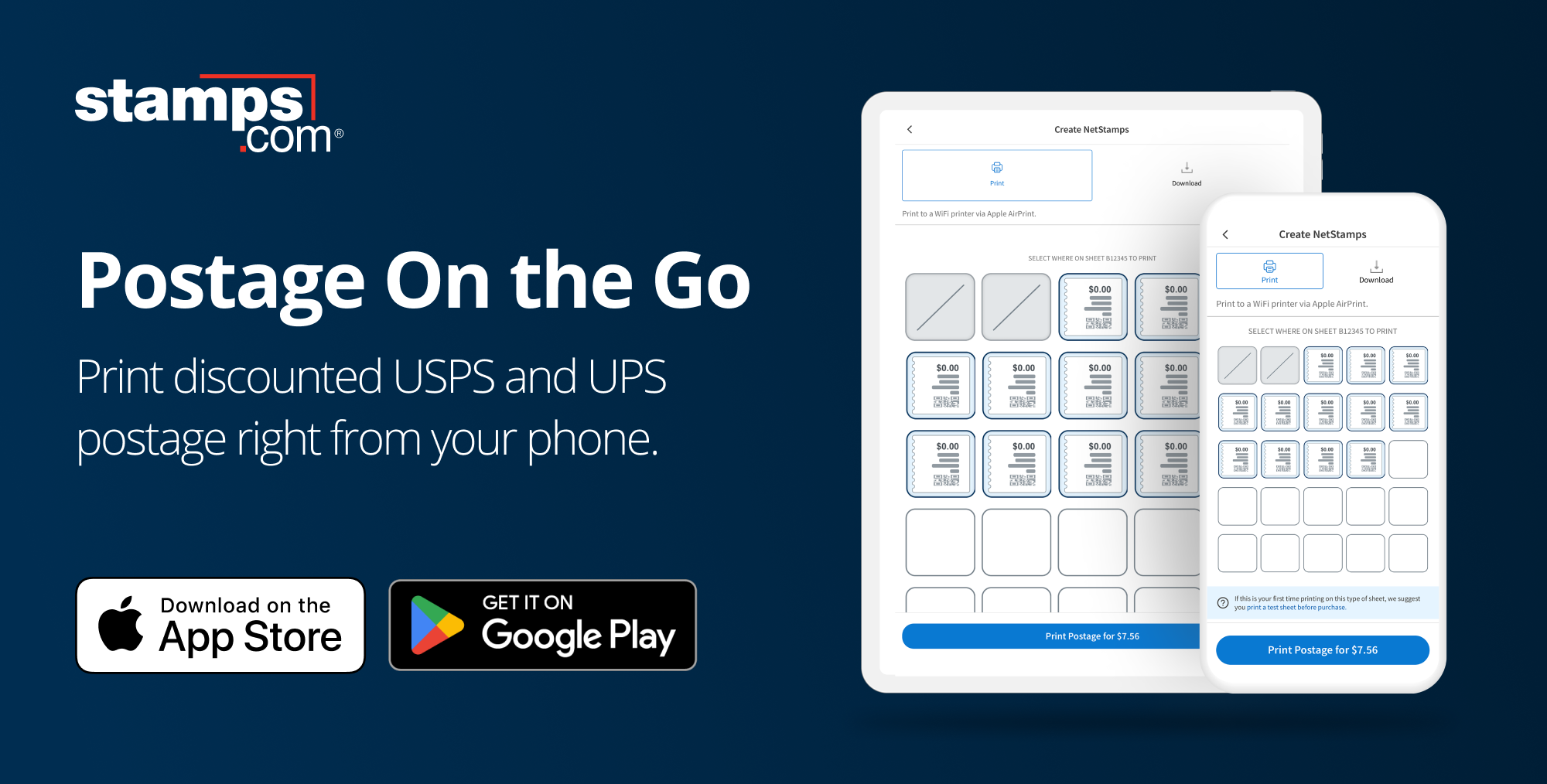
Getting through all of your tasks can be hectic, but the Stamps.com Mobile app adds flexibility to your day by making it easy to ship packages or mail letters from anywhere at any time. Our mobile app now allows you to conveniently print discounted USPS® stamps and USPS® and UPS® labels, enabling you to send letters and packages of any weight and any size. Learn how to efficiently manage all your shipping and mailing needs directly from your phone with the new and existing features included with the Stamps.com Mobile app.
With the Stamps.com Mobile app, you can now print USPS postage on NetStamps®, print stamps directly onto any envelope, or effortlessly generate shipping labels straight from your phone. This way you don’t have to put off your mailing and shipping tasks until you’re at home or the Post Office™.
Stamps customers are always on the go. Over half of the traffic to Stamps comes from a mobile device, and now these visitors can mail and ship on their preferred device.


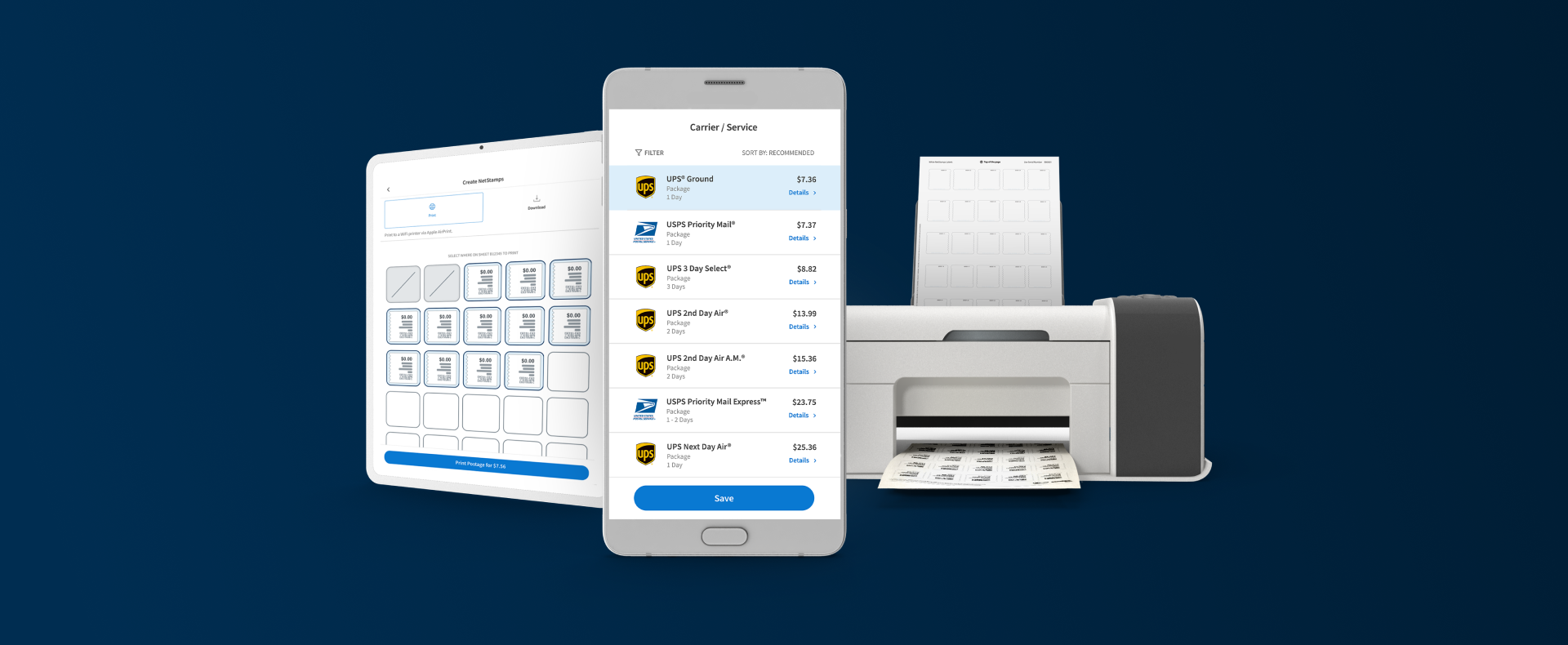
The Stamps.com Mobile app offers a wide range of advantages, making it an essential tool for all your mailing and shipping needs. Here’s why you’ll love using it:
Time-Saving Convenience: Say goodbye to the inconvenience of repeated trips to the Post Office™. With the Stamps.com Mobile app, you can handle all your mailing and shipping tasks from the comfort of your home, office, or on the go. No more wasted time or energy on unnecessary errands.
Significant Shipping Discounts: Take advantage of discounts on postage and savings up to 89% on labels. You’ll be able to compare carrier rates, ensuring you always get the best deal on your shipments.
Easy Printing: Printing stamps and labels for any type of mail or package has never been simpler. The app streamlines the process, eliminating the need for manual calculations and handwritten labels.
Flexible Account Management: Managing your account is a breeze. You can easily add funds, keeping your account topped off for uninterrupted service. This is especially useful for business owners and individuals who rely on consistent mailing and shipping.
Mobile Accessibility: The app’s mobile accessibility lets you track and manage your mail and shipments on the go, at any time. Whether you’re at home, in the office, or on the move, you’re always in control of your mailing and shipping activities.
Enhanced Multitasking: We understand that multitasking can be a challenge. You can now focus on your tasks without the constant back-and-forth between your computer and supply area.
In a nutshell, the Stamps.com Mobile app provides time-saving, cost-effective, and user-friendly solutions to streamline your mailing and shipping processes. Say hello to simple and wave goodbye to the hassles of traditional mailing methods.
With the latest enhancements to the Stamps.com Mobile app, the busiest mailers and shippers can take their first printing step while they’re on the move.
How does the Stamps.com Mobile app work?
Stamps.com is the simplest way to mail letters and ship packages from home, work, and now your phone. Download the app today and start sending.
USPS is upgrading all postage meters to use a new system called Intelligent Mail Indicia (IMI). This will replace the older system, Information Based Indicia (IBI), after 20+ years of use. IMI has more updated technology and has been slowly rolled out over the past 10 years.
What does this mean, and how do these changes affect your business? Let’s start with the basics. Intelligent Mail Indicia (IMI) is the technology postage meters use to send information to USPS. Beginning June 30, 2024, any postage meters still using IBI will be decertified. However, USPS will accept postage from decertified meters until December 31, 2024. After this time, your postage meter will require IMI technology to remain in use.
The good news is, Stamps.com customers don’t need to worry about these changes. We’re dedicated to making this transition as smooth as possible, and there are no changes needed on your end. While no action is necessary, IMI and its benefits are worth understanding.
Indicia, or Permit Imprint Indicia, is a form of printed postage that takes the place of a traditional stamp or postage meter marking. IBI, like IMI, is a form of printed postage. It was created to provide USPS with more centralized data and heightened security.
After 20+ years of IBI, USPS has been rolling out IMI over the past decade. IMI is built off of IBI but has more up-to-date technology. To align with their ten-year initiative, USPS will now enforce adoption of IMI for all postage meters.
For Stamps.com customers, this change is automatic. Our team is already working to make these changes, and your workflow won’t be interrupted. Additionally, these changes will be implemented by December 30, 2024 to comply with the new regulations.
If you have any questions about these changes, please contact our Support team via email or phone at 855-608-2677, M-F from 8am-8pm CT.
IMI comes with a few advantages. Some of these include:
IMI provides even more data encryption and fraud protection. Encrypted data prevents your information from being accessed or stolen. Also, increased security checks are more likely to flag fraudulent activity sooner.
IMI lays the groundwork for automating tasks that could otherwise cause delays. Avoiding these delays can lead to faster delivery times and shortened wait times. This new technology also decreases the likelihood of adjustments given to incorrect measurements.
IMI allows for more detailed tracking, so you can track refunds with ease. IMI barcodes also include information like insurance, keeping everything in one place.
If you use a postage meter, these changes can be unexpected, expensive, time-consuming, and complicated. You’ll also need to contact your provider about their IMI adoption plan. If you’re a Stamps.com customer, these changes will be made for you. Our NetStamps® postage is up to date and won’t require any updates. We eliminate the need for special equipment, so you can buy and print postage online from anywhere at any time.
Learn more about Stamps.com’s Multi-Location plan.

National Administrative Assistants’ Day is a time to recognize the amazing individuals who keep our offices running smoothly. They’re the glue that holds everything together, the first line of contact, and the masters of juggling a million tasks at once. But let’s be honest, even superheroes have their kryptonite.
At Stamps.com, we understand the unique challenges faced by office administrators. We see you, and we appreciate you! That’s why we’ve identified five common pain points and how Stamps.com can help you conquer them:
Running out of stamps at the worst possible moment is a surefire way to derail your day. Stamps.com eliminates that stress entirely. Print postage directly from your computer with any design you choose, on demand, so you’re always prepared.
Managing different shipping carriers and accounts can be a logistical nightmare. Stamps.com offers a one-stop shop for all your shipping needs. Compare rates from carriers including USPS, UPS, GlobalPost, and DHL. You can print your shipping labels and even schedule pickups on a single platform. No more scrambling between accounts or carrier websites.
Keeping track of postage and shipping costs can be a tedious task. Stamps.com provides clear, detailed reports that help you manage your budget effectively. See exactly where your shipping and mailing dollars are going and identify areas for potential savings.
Juggling multiple tracking numbers from different carriers can be a time-consuming headache. Stamps.com streamlines the process by offering centralized tracking for all your shipments and mail, giving you peace of mind and keeping your customers informed.
Managing piles of invoices and receipts can be overwhelming. Stamps.com offers paperless options, allowing you to store and access all your shipping and mailing documentation electronically. Save time, reduce clutter, and go green!
National Administrative Assistants’ Day is a wonderful opportunity to show appreciation for these invaluable members of your team. But why stop there? Stamps.com can be your partner year-round, helping to streamline workflows, save time, and reduce stress for your amazing office admins. Let them focus on what they do best – keeping the office running like a well-oiled machine.
Ready to make life easier for your office heroes? Visit Stamps.com today for a free trial!

Beginning May 15th, shipping services for hazardous materials (HAZMAT) will be temporarily restricted to only Ground Advantage™. As a result, we’ll continue to support HAZMAT shipping through this ground service.
Shipping hazardous materials correctly is important to Stamps.com and USPS. In fact, hazardous materials cause damage if shipped incorrectly. That’s why many dangerous goods are restricted from airplane freight. For this reason, the adoption of Ground Advantage™ works to keep everyone safe.
Shipping HAZMAT materials comes with its own set of challenges. Most hazardous products fall into one of two categories: prohibited and restricted. The first category is items you can’t ship through USPS. The second category is items you can ship through USPS but need to utilize hazardous labels and abide by USPS regulations.
Let’s start with the first category. Some of the hazardous materials you can’t ship through USPS are:
Now, let’s move to the second category. These are items you can ship through USPS. They’ll just need to include all the necessary HAZMAT labeling and packaging and follow USPS HAZMAT guidelines. Examples of these items are:
We recommend contacting USPS support with any questions before shipping. Their support team should be able to provide you with more information.
It’s easy to forget that batteries are hazardous materials. However, you can ship batteries through USPS. Just clearly and legibly label them with the right documentation. Non spillable batteries are also eligible for shipping. But, the batteries need protective packaging in case of leaks in transit.
Additionally, you can ship batteries out of the package. For example, you may include batteries in broken or refurbished electronic products. These packages will need the following labels as well:
You can also learn more information about shipping batteries on the USPS website.
Did you miss the HAZMAT changes from earlier this year? Catch up on those updates below!
Starting January 21st, USPS is enhancing safety measures for handling dangerous goods shipments. HAZMAT labels will now feature:
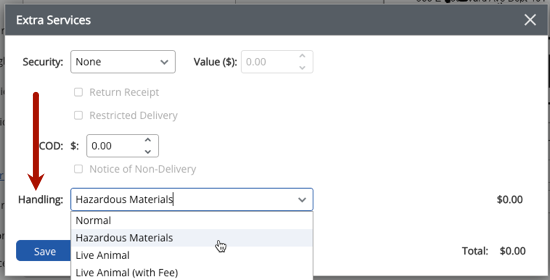
Shippers don’t need to take any additional action. Just select the hazardous goods option when printing your label. This goes for any shipments containing hazardous materials. We’ll cover everything you need to know about upcoming HAZMAT changes. This includes reminders for shipping hazardous materials in general.
HAZMAT labels will now feature two 2D IMpd™ barcodes. These new barcodes contain the same information as the existing IMpd barcodes. They will also help optimize processing automation. Additionally, these updates minimize distortion and printer errors. This makes it easier to scan labels.
The barcode banner text will now read: USPS TRACKING # HAZMAT. This increases visibility and improves the shipping experience. HAZMAT labels will also now feature an oversized letter “H” in the corner.
The second change is two-fold. These changes include new Dangerous Goods Service Type Codes, or STCs. STCs are numeric codes that identify a package’s mail classification and characteristics. This update also includes new IMpd label banner text. This way, packages are appropriately handled as they move through transit.
Stamps.com customers don’t need to adjust their workflow. Instead, labels created for hazardous materials will automatically include the new format. More information can be found in our Help Center. We’ve also included the steps for declaring hazardous materials below.
Start your 30-day free trial with Stamps.com today.
Mailing Lithium Batteries – USPS TV
USPS HAZMAT guidelines and restrictions USPS TV’s Guide to Mailing Hazardous Materials

Regardless of the products you sell, returns will always be part of your business. Sometimes, clothing doesn’t fit correctly, a customer accidentally bought the same gift as someone else, or the recipient would prefer a different product. While the reasons may vary, your return policy should be consistent because customers are taking note.
Our recent study with Retail Economics found that 24% of customers stated inconvenient returns were their biggest concern during the holiday season globally. With almost 1 in 4 customers letting your return policy influence their purchasing decisions, your business can’t afford to ignore customer expectations. We’ve created 5 tips to help businesses of all sizes craft a successful return policy to boost holiday sales and customer satisfaction.
Read through your return policy from a customer’s perspective. Are any steps unclear? Would you be able to successfully return a product to your business? If any part of your return policy needs a couple of rereads to understand, rewrite it. Customers should be able to follow your return policy without hesitation; if you can’t follow your return policy, it’s likely your customers can’t either. It also may be worth adding an FAQ section and/or bullet points within your text, so it’s easier for customers to scan.
On the other hand, too much text can prove to be confusing or difficult to read. Consider using graphics or illustrations to accompany your directions. For example, if you’re going to send customers a return label with their initial purchase, include a picture of a label so they know what to look for. You can even include illustrations or stock images of “customers” completing the return process to make your policy stand out from the competition.
Customer feedback is crucial for a business, especially during the holiday season. Asking customers the reason for their return can provide valuable insight for your business. For example, if customers are responding that a shirt doesn’t fit correctly, it may be time to adjust the sizing, description, and photo on your website.
Additionally, if you begin to see feedback around late delivery, you may need to offer different carrier services to better suit your customers’ needs. Our study found that 40% of customers are most concerned about late delivery or packages arriving when no one is home globally, so it’s worth keeping in mind.
Say a customer loves the skirt they purchased from your store, but they need a different size or would like a different style. Instead of only offering returns, why not offer exchanges? Not only do exchanges help your business recoup some of the marketing and fulfillment costs spent on promoting and packaging products, but it shows your customers you’re willing to go the extra mile. This leads to increased customer satisfaction, which leads to the increased possibility of repeat business.
Between holiday travel and inclement weather, circumstances outside of your customers’ control can lead to late returns. We recommend extending your return window during the holidays for this very reason. However, you can still reward customers who return products within a shorter timeframe. The longer a customer waits to return their product, the higher the chance a product will have to be discounted and/or can’t be resold. Rewarding customers who can return orders faster will encourage them to do so in the future.
Life is full of errands, and the holiday season only adds more. Customers may also be visiting friends and family, so they aren’t sure where the closest carrier drop-off locations are. Providing your customers with resources to find carrier drop-off locations helps them to drop off returns more efficiently. This means orders can be returned faster, as customers aren’t having to search for drop-off locations themselves. Most carriers include locator links on their websites that are easy to include on your website as well.
Ship and mail from anywhere this holiday season with the Stamps.com Mobile App.
Call us toll-free at 1-888-434-0055
Monday–Friday, 6am–6pm Pacific Time